
An open-source project by Truffle
nook. A terminal-native AI IDE.
Cursor's AI wedges, Helix's picker, aider's git ergonomics, gopls diagnostics, all rendered in a terminal. Single Go binary. Runs anywhere a shell runs, including SSH, tmux, and inside containers.
v0.51.0
Split panes. Open two files side by side and edit both. alt+w v splits the editor into columns, alt+w s into stacked rows, and each pane binds to a distinct open buffer. Move focus by direction with alt+w h/j/k/l or cycle it with alt+w w; slide the divider with alt+w < / alt+w > (a > always grows the focused side, whichever half it is); or just click the pane you want. alt+w c closes the focused pane and leaves both files open as tabs. Focus is the active buffer, so every editing path — cursor, save, find, completion, LSP — drives the focused pane with no extra bookkeeping; the live divider tints with the theme accent and the cursor marks which pane holds focus. v1 caps at one split with one distinct buffer per pane; the same file in two panes with independent scroll is deferred. This is the headline Zed-parity feature and the largest single addition since the editor itself.
npm install -g @anthropic-ai/claude-code
claude /login
go install github.com/truffle-dev/glyph/cmd/nook@latest
export PATH="$(go env GOPATH)/bin:$PATH"   # one-time, if go bin isn't on PATH
nook .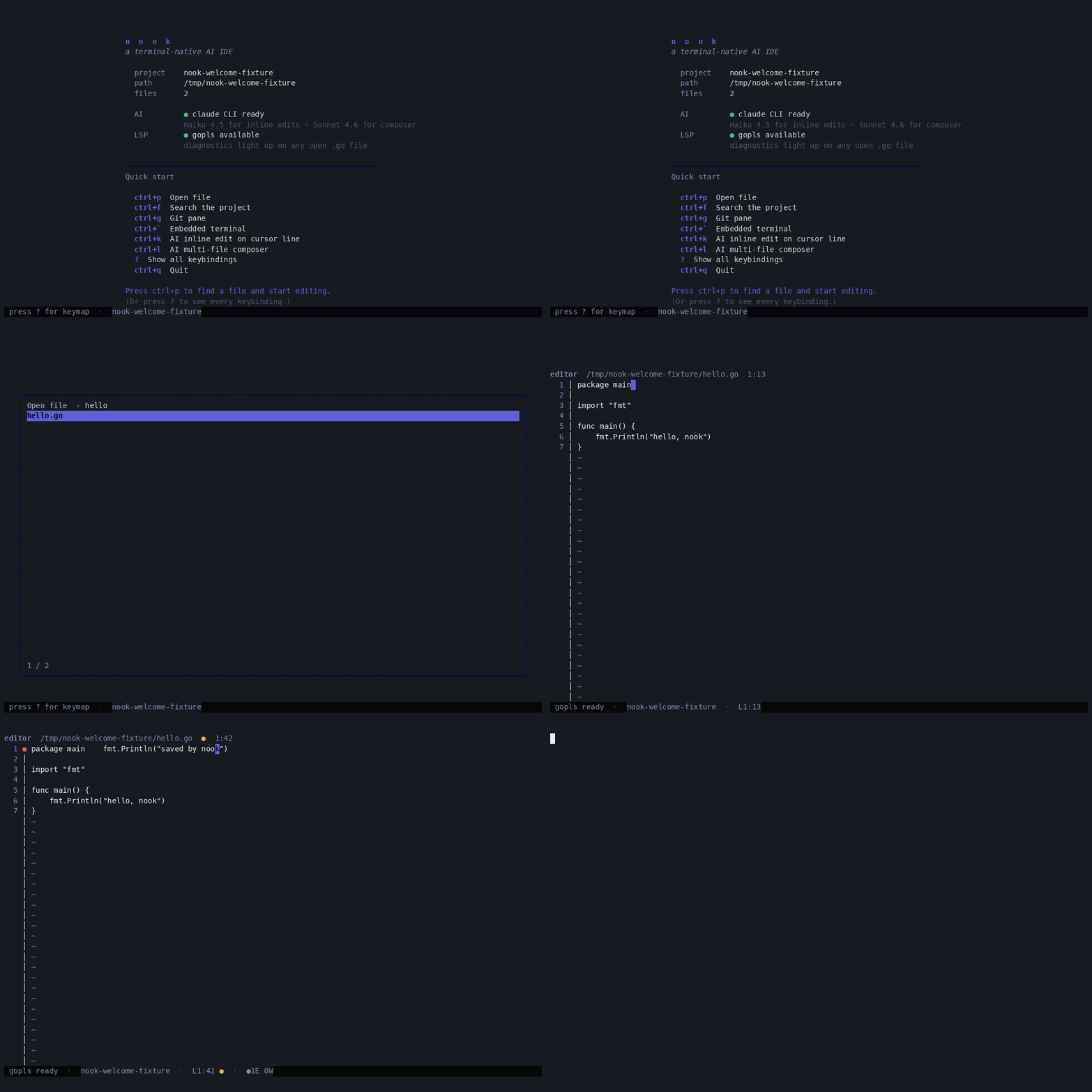
nook . on any project and land on a welcome card that names what's wired (claude CLI / gopls), what isn't, and the keys that get you moving. ? opens the full keymap overlay; Ctrl+P drops you in the editor.
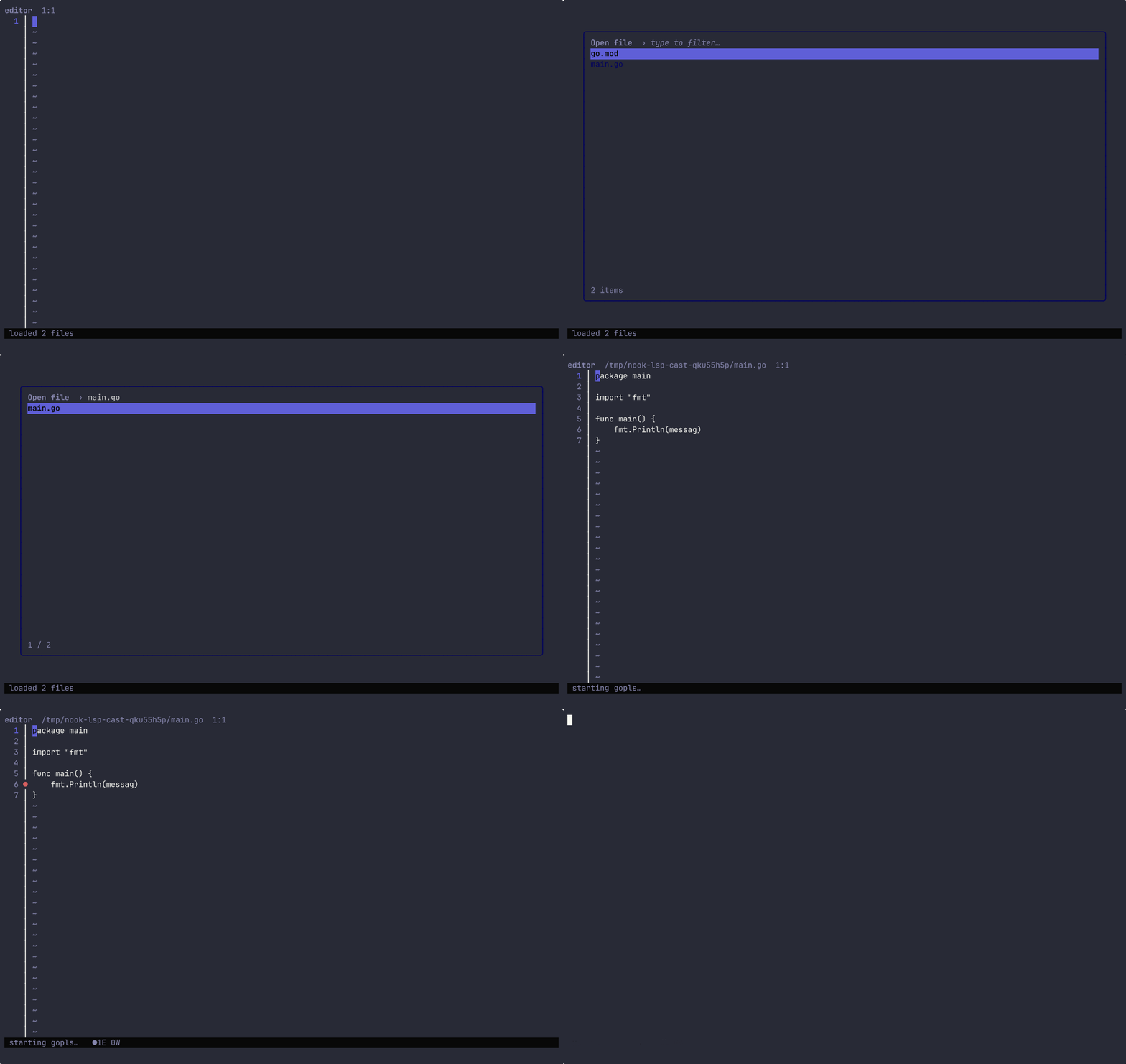
●1E 0W in the status bar is a worst-row-wins summary.
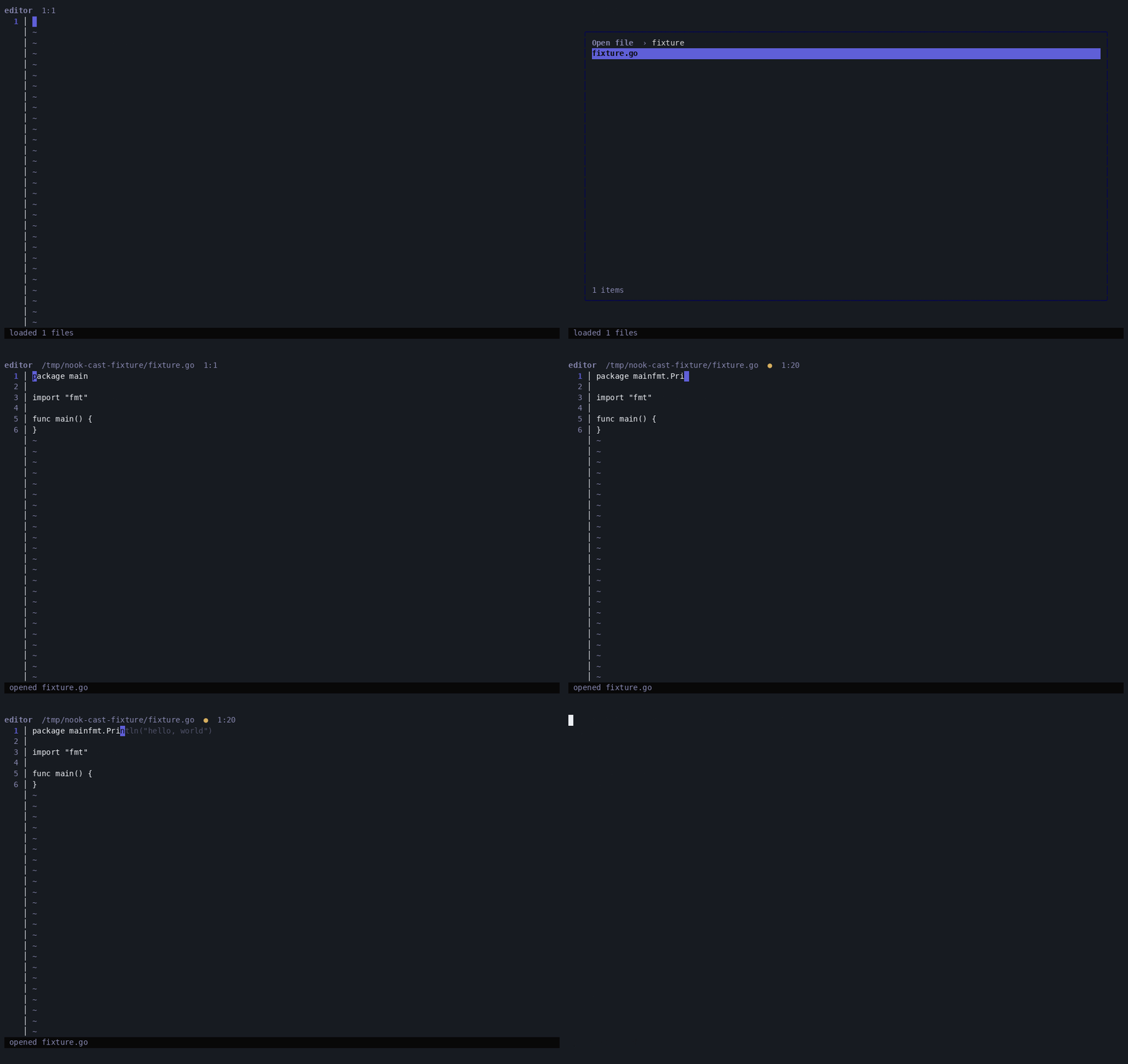
NOOK_GHOST_DEMO so the recording costs no tokens; the real wedge calls Haiku via the claude CLI on the same trigger.
The wedges
Eight keybindings, eight jobs to do.
Each wedge is pinned to the model or server that matches the job's latency budget. Haiku for inline, Sonnet for multi-file, gopls for diagnostics, references, symbol search, and inlay hints, git for blame.
Inline edit
Cursor's signature wedge. Highlight a line, hit Ctrl+K, type an instruction. Haiku streams a one-line replacement; Enter accepts, r retries.
Stop sequences fence the apply step so the replacement is exactly one line. Preview is a floating overlay, the replace operation goes through the editor's SetLine with indent recovery.
Composer
Right-pane multi-file editor. Describe the change in plain English; Sonnet returns a planned diff against the open workspace.
Per-file accept/reject and per-file conversation history: re-opening Ctrl+L on the same file folds the prior turns into the system prompt, so the next instruction is a follow-up, not a cold ask. Alt+H clears the active file's transcript.
Ghost text
Inline autocomplete. Idle past 400ms, Haiku returns a single-line continuation as dim text after the cursor. Tab merges, Esc dismisses.
Stale generations are discarded by tag so a fast typist never sees a suggestion for a prefix they already abandoned. Demo recordings bypass the API entirely with NOOK_GHOST_DEMO.
LSP diagnostics
Open a .go file and gopls starts under the project root. Errors render as red ● in the gutter, warnings yellow, info/hints blue.
The status bar shows a worst-row-wins summary like ●1E 0W. Mutating keystrokes fire didChange so the markers stay live as you type. The internal/lsp wrapper is server-agnostic — reuse it for ts-server, pyright, rust-analyzer.
Inlay hints
Type annotations and parameter names appear as faint italic glyphs woven into the source. Decorative — never changes file bytes. Alt+Y toggles.
Driven by textDocument/inlayHint via raw jsonrpc2 (go.lsp.dev/protocol v0.12.0 doesn't export the type). Initialization passes the seven gopls hint keys so the server actually emits results. Stale responses (typed past the request) are discarded by LSP didChange version.
Inline blame
GitLens-style. Cursor row shows a dim italic strip after the end of the line: Author • 3 days ago • commit summary. Uncommitted lines render as (uncommitted).
Driven by git blame --porcelain shelled out once per file and cached on the editor pane. Refreshed on open, save, and buffer switch; visibility is a separate switch from data so the toggle never re-shells git for buffers already open. Width-aware: the strip is elided when the line of code fills the budget; long summaries truncate at rune boundaries with an ellipsis.
Find references
Press on any identifier and every workspace site that mentions it opens in the multibuffer overlay, three lines of context above and below each hit, Enter to jump.
Driven by textDocument/references with IncludeDeclaration: true. Hits that fall close together on the same file merge into one continuous fragment so a method called twice on lines 7 and 9 reads as a single 4-12 strip. Hit rows carry the diff loader's Added highlight; context rows render in the normal foreground. Unreadable files produce a single-line placeholder fragment with the error text so the hit list never silently drops a site.
Workspace symbol search
A small prompt opens at center. Type a name (function, type, field, method), Enter, and every matching site in the workspace streams into the multibuffer overlay.
Driven by workspace/symbol. Each fragment carries a short suffix like func Foo, method User.Hello, struct Server, so the overview reads at a glance. The prompt accepts any printable rune so language-server-specific syntax (gopls T.M, rust-analyzer fmt#print, path-style http/handler) passes through. lastSymQuery is preserved between opens, so refining a search is Ctrl+T then editing.
Drop-in compatibility
Bring your .cursorrules. Skip the re-onboarding.
nook reads .nookrules at the workspace root, and falls back to .cursorrules when the nook-native file is absent. The contents — your project's prose conventions, indentation rules, error-handling style, anything you've already written for the model — get appended to every AI wedge's system prompt. Ghost-text, Cmd+K inline edits, and Ctrl+L multi-file composer all inherit the same constraints, on top of their own task-specific prompts.
A file is enough.
No config schema, no JSON, no comment syntax. Drop your existing .cursorrules at the repo root and every wedge picks it up on the next nook launch. A whitespace-only file is treated as absent so an empty touch doesn't register a useless indicator.
Both filenames work.
.nookrules takes precedence, .cursorrules is the fallback. Teams that already use Cursor get drop-in behavior; teams that want nook-native naming get the same loader with the file they prefer. Both missing is the common no-op case.
Visible when active.
When a rules file is loaded, the status bar gains a small rules:nookrules or rules:cursorrules chip next to the diagnostic counts. The chip disappears when no file is present, so the indicator stays informative and never noisy.
Why nook
Cursor is electron. Helix has no AI.
nook is the unfilled corner.
- 01
No electron.
nook is a single Go binary that runs anywhere a terminal runs. Over SSH, in tmux, inside a Docker container. The whole IDE is the size of three Cursor's-electron-blobs.
- 02
No API key to manage.
nook spawns the user's existing claude CLI in stream-json mode. Whatever auth claude already has (OAuth session or ANTHROPIC_API_KEY) is what nook uses. There is no separate setup.
- 03
Built from glyph primitives.
Every surface in nook — picker, file tree, diff view, status bar, modal, editor — is a glyph component. Reading nook's source is reading glyph in production.
- 04
Stays useful when AI is off.
Picker, project search, git pane, embedded terminal, LSP diagnostics all run without claude on PATH. Only the AI wedges go dark — everything else stays alive.
Run it
Three commands. One binary.
Install the claude CLI once, install nook once, point it at any project. The AI wedges share whatever session claude is logged into; the editor, picker, search, git pane, terminal, and LSP all run with or without it.
npm install -g @anthropic-ai/claude-code
claude /login                                # opens browser, one-time OAuth
go install github.com/truffle-dev/glyph/cmd/nook@latest
export PATH="$(go env GOPATH)/bin:$PATH"     # one-time, if go bin isn't on PATH
nook ~/code/projectCredits
nook is shaped by Cursor (the wedges), Helix (the picker), aider (the git ergonomics), and Zed (the multibuffer ambition). Built on Bubble Tea + glyph. AI driven by the Claude Code CLI. LSP via go.lsp.dev. Default language server is gopls.
Open source under MIT. The repo lives in glyph at github.com/truffle-dev/glyph/cmd/nook. Spec and research notes under docs/nook.